
Teardowns: The design decisions behind top AI products.
 Read teardown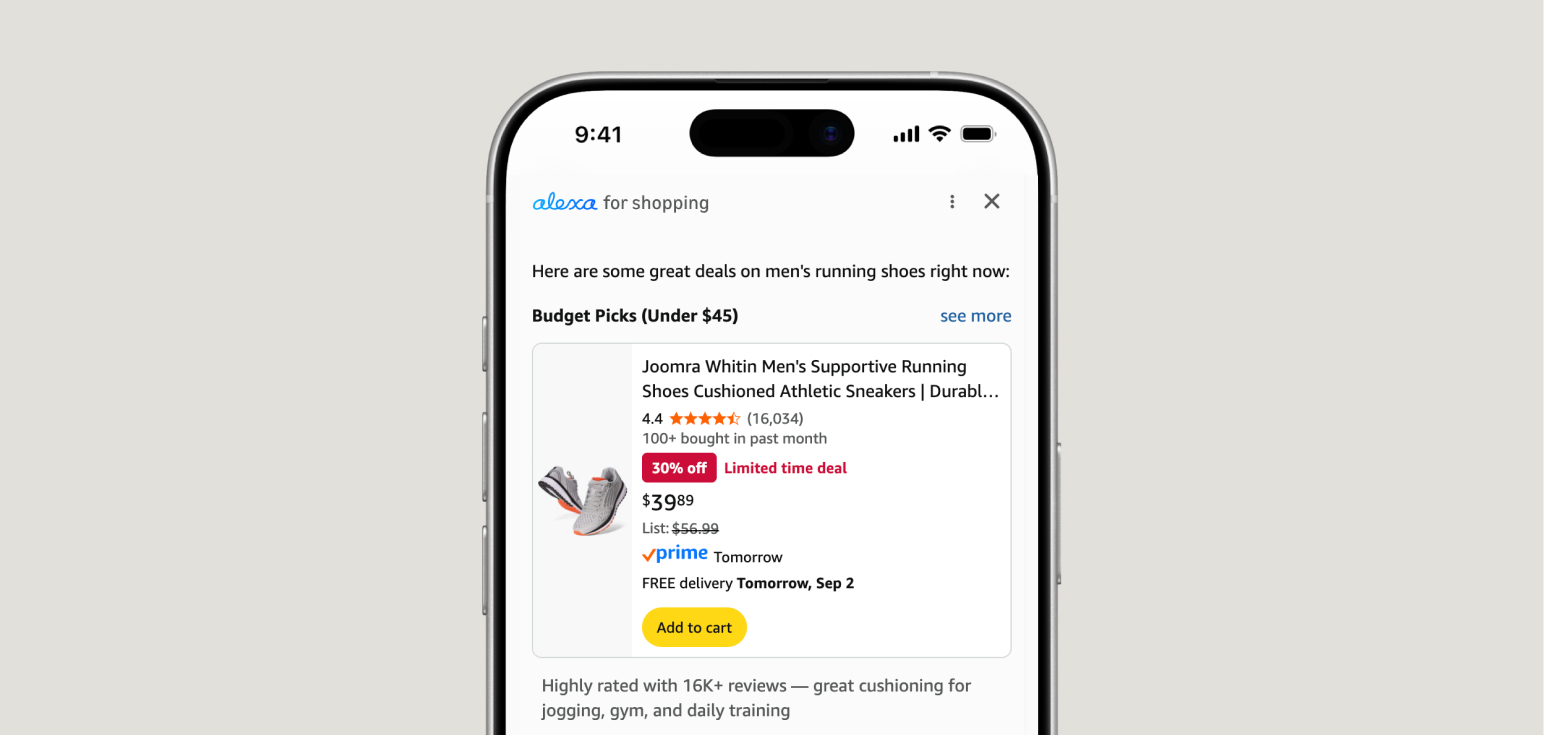
Composer
See allHow products keep the default bar familiar while scaling casual users into power features.
 ChatGPTChatGPT composer UX: input bar, tools & voice designComposer · 19 screens
 ClaudeClaude composer UX: model picker, skills & attachmentsComposer · 17 screens
 DeepSeekDeepSeek composer UX: DeepThink, Search & modesComposer · 12 screens
 KimiKimi composer UX: agent pills, Instant/K3 & skillsComposer · 26 screens
 ManusManus composer UX: assign tasks, modes & agent tiersComposer · 20 screens
 GLM (Z.ai)GLM (Z.ai) composer UX: Magic Design, Deep Think & AgentComposer · 26 screens


Output & artifacts
See allHow products let users iterate and ship work in-thread instead of restarting or context-switching.
- ChatGPTChatGPT output UX: in-thread replies & refinementOutput & artifacts · 18 screens
- ClaudeClaude output UX: replies, retry & feedbackOutput & artifacts · 12 screens
- ManusManus output UX: agent runs, files & deliverablesOutput & artifacts · 10 screens
 QwenQwen output: keep the chain in the threadOutput & artifacts · 18 screens
 PerplexityPerplexity output UX: tabs, follow-ups & exportOutput & artifacts · 18 screens
 GeminiGemini output UX: guides, tables & Workspace handoffsOutput & artifacts · 18 screens


Human in the loop
See allHow products gate consequential actions with clarifying questions, approval UI, and granular tool consent.


Model & mode selection
See allHow products help users pick model tier and depth without exposing raw model IDs as the only decision.
- ClaudeClaude composer UX: model picker, skills & attachmentsComposer · 17 screens
- GeminiGemini composer UX: tools, Drive & thinking modesComposer · 13 screens
- DeepSeekDeepSeek composer UX: DeepThink, Search & modesComposer · 12 screens
- KimiKimi composer UX: agent pills, Instant/K3 & skillsComposer · 26 screens
- GLM (Z.ai)GLM (Z.ai) composer UX: Magic Design, Deep Think & AgentComposer · 26 screens
- PerplexityPerplexity composer UX: search modes & connectorsComposer · 17 screens


Onboarding
See allHow AI products help users reach a first successful outcome without a blank screen or setup wizard.





Trust & citations
See allHow products prove credibility and protect data while keeping users in the flow.


Personalization & memory
See allLet users shape tone, memory, and persona without feeling surveilled.
- ChatGPTChatGPT personalization UX: tone presets, memory & profile designPersonalization & memory · 16 screens
- ClaudeClaude personalization UX: profile, memory & voice designPersonalization & memory · 14 screens
- PerplexityPerplexity personalization UX: vertical profiles, response style & memoryPersonalization & memory · 18 screens


Pricing & upgrades
See allHow AI products introduce paid tiers mid-funnel and inside the composer without breaking first-task momentum.
- ManusManus onboarding UX: role segmentation & Pro upsellOnboarding · 10 screens
- DeepSeekDeepSeek composer UX: DeepThink, Search & modesComposer · 12 screens
- PerplexityPerplexity composer UX: search modes & connectorsComposer · 17 screens
 LovableLovable onboarding UX: setup wizard & segmentationOnboarding · 10 screens
Shopping
How AI products shorten discovery-to-purchase with in-product feeds, cards, and checkout.


Local search
How products answer messy local asks with pins, place cards, and lists instead of a chat transcript.



Video discovery
How video platforms turn search into synthesized guides with cited clips, compare metadata, and follow-up loops.



Frequently asked questions
What is an AI UX teardown?
An AI UX teardown is a screenshot-backed case study of how a shipped AI product solves a specific design problem: composer layout, onboarding, output refinement, or trust signals. This hub includes 45+ live guides with walkthroughs, tradeoffs, and links to reusable patterns in the main catalog.
How is this different from the pattern library?
Patterns document named UX conventions with demos and when-to-use guidance. Teardowns show how real products (ChatGPT, Claude, Perplexity, Gemini, and others) implement those conventions in production, useful for competitive benchmarking before you write a spec or pick a pattern.
Which AI products have UX case studies here?
Live guides cover ChatGPT, Claude, Perplexity, Gemini, Grok, Google AI Mode, Lovable, DeepSeek, and Notion AI across composer design, output and artifacts, onboarding, personalization, human-in-the-loop, and citations. New products are added as screenshots and analysis are completed.
How do I compare ChatGPT vs Claude composer design?
Open the composer comparison at /teardowns/compare/design-the-composer for a table-first synthesis of ChatGPT, Claude, Perplexity, and Gemini, then drill into each product teardown for screenshots and tradeoffs. The comparison covers default bar, tools, model cost, attachments, and voice.
How do I compare ChatGPT vs Perplexity citations UX?
Open the citations comparison at /teardowns/compare/trust-privacy-settings for a table-first synthesis of ChatGPT and Perplexity sources design: inline chips, claim previews, audit surfaces, research steps, and wrong-source feedback. Then open each product citations teardown for screenshots.
How do I compare ChatGPT vs Claude vs Perplexity personalization?
Open the personalization comparison at /teardowns/compare/personalization-memory for tone controls, profile, memory model, and off-ramps across ChatGPT, Claude, and Perplexity. Use the table to pick an approach, then drill into each product personalization teardown.
How do I compare AI output and artifact UX?
Open the output comparison at /teardowns/compare/output-artifacts-refinement for how ChatGPT, Claude, Gemini, and Manus handle answers, side panels, refinement, and deliverables. Then open each product output teardown for screenshots.
How do I compare AI onboarding and first-value UX?
Open the onboarding comparison at /teardowns/compare/ai-onboarding-first-value for role pickers, first-home empty states, and early upsells across products, then drill into each product onboarding teardown.
How do I compare human-in-the-loop UX across AI products?
Open the human-in-the-loop comparison at /teardowns/compare/human-in-the-loop for approval cards, clarifying questions, send gates, and handoffs. Use it when designing agent actions that need user consent before side effects.
How do I compare model and mode selection UX?
Open the model selection comparison at /teardowns/compare/model-mode-selection for nicknames vs raw IDs, effort controls, and mode chips across ChatGPT, Claude, Perplexity, and Gemini.
How do I compare AI pricing and upgrade UX?
Open the pricing comparison at /teardowns/compare/pricing-upgrade for where products surface locks, plan gates, and upgrade CTAs inside the composer and workflow—not only on a pricing page.
Who are these AI UX case studies for?
Product designers, design engineers, and PMs shipping chat assistants, copilots, and agentic products. Use teardowns in design reviews, PRDs, and competitive audits when you need evidence from shipped interfaces, not generic wireframes.
How often are teardown guides updated?
Each guide shows a last-updated date when copy or screenshots change. AI products ship UI updates frequently; we refresh walkthroughs when major composer, onboarding, or trust patterns change in production.