
How AI Is Changing the UX Designer Role (And What to Do About It)
Design used to be about making the right thing. More and more, it's about choosing the right thing from what AI makes. And knowing why.
Design used to be about making the right thing. More and more, it's about choosing the right thing from what AI makes. And knowing why.
A few years ago, "UX designer" meant: research, wireframe, high-fidelity mock, handoff. The output was a spec. The tool was usually Figma. The process was mostly deterministic. Given a brief, you produced a defined set of screens.
That model is cracking. Not because design is dying. Because the role is shifting from making to curating, judging, and directing. The tools are changing. So is the nature of the product.
This shift is furthest along in teams that build AI-native or AI-heavy products and that are willing to treat code as the source of truth. If that's not your world yet, think of what follows as the direction of travel.
Here's how I see it, where I'd push back, and what I'd double down on.
1. The bar is rising. Code prototypes, not only Figma.
There's a line that used to go around Facebook: no one is excited about wireframes. In the teams that set the tone for product design, the bar has moved. Stakeholders and engineers increasingly want something they can click, scroll, and react to. Not only static mocks. Code prototypes. Real interactions. Real data. Real behavior. High-fidelity used to mean "polished screens." In those contexts it often means "something that runs."
So the reframe: Figma isn't being replaced by one tool. It's being displaced from the default to a default. For quick iteration and "does this direction work?", text to code is often faster than text to Figma to dev. The default path is shifting for many projects from "design in Figma first" to "generate a runnable prototype, then refine." If you're in a place where that's still rare, you're not behind forever. But the bar is rising.
2. Double translation is a real cost. The output was always code.
Figma (and tools like it) sit in the middle of a double translation.
First: design to spec. You turn ideas into layouts, components, and redlines. Second: spec to code. Engineering reads the spec and hopefully translates it back into code.
The ultimate output was always code. Every pixel and interaction ends up in the app. So we pay twice. Once in design time to make the spec. Once in engineering time to interpret it. We lose fidelity both times. Specs get misinterpreted. Details get lost. The only source of truth is the running product.
Vibe coding and AI-assisted dev can collapse that. When the designer (or a designer–engineer pair) produces a prototype in code, that artifact can go straight to a coding agent or an engineer. One translation: idea to code. Less drift. Less "that's not what I meant." That gain is biggest where engineers actually treat the prototype as the reference instead of rewriting from scratch. Where they do rewrite, you still get two steps: prototype code, then production code. So "one translation" is a target. It depends on how your team works.
3. Static tools don't work for the dynamic apps. Vibe coding is the default there.
AI-native products have big chunks that are dynamic. Outputs stream. They vary by context. They depend on the model and the user. You're not designing a fixed set of screens for those parts. You're designing behaviors, states, and feedback. Static tools are built for static artifacts. One frame per state. Manual variants. No real "run it and see."
So for the dynamic, AI-driven parts of the product, vibe coding isn't optional. It's the default. You need something that can express and evolve behavior: streaming, retry, citations, confidence, tool use. That's code (or code-generating flows), not a static canvas. A lot of the rest of the app is still static. Settings. Dashboards. Onboarding. Lists. For those, Figma (or similar) is still the right tool. So Figma isn't "demoted" everywhere. It stays central for the static UI. It becomes a specialty for the dynamic, AI-native surfaces only if your product is mostly those. If most of your screens are traditional, Figma is still your main tool.
4. From deterministic to probabilistic. Design for variance, not a single frame.
This is the deepest shift. Classic product design assumed deterministic behavior. Same input, same output. You designed screens. Fixed states.
AI products are probabilistic. The user controls the input. Text, voice, image, video, their own language. The output varies with the model, context, and personalization. You're not designing one screen. You're designing ranges of outcomes: streaming, partial answers, errors, "I'm not sure," citations, confidence, retry.
So the design job expands. It's no longer only "what does this screen look like?" It's "what does the system do when the answer is wrong, slow, or uncertain?" The hard part is no longer only pixels. It's states, feedback, and trust. You need patterns for streaming, progress, citations, confidence, human-in-the-loop, and error recovery. Those patterns are the new core of the craft. A growing catalog of AI interface patterns, chat, trust, agents, and more, lives here.
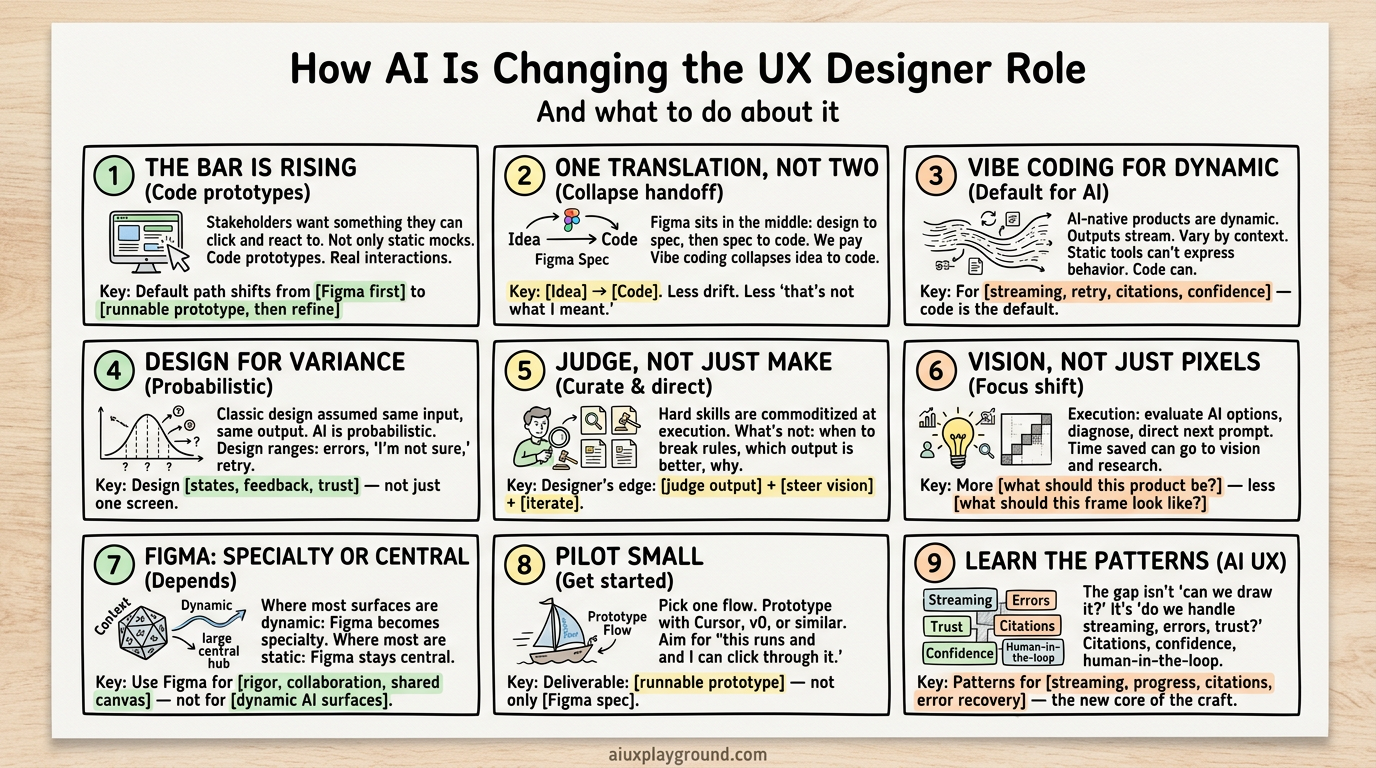
5. Hard skills are being automated. "Replaced" is the wrong word.
A lot of what we used to consider "hard skills" is being automated. Basic usability heuristics. Layout grids. Design systems. Accessibility checks. Even first-pass copy. AI can generate layouts, apply a system, and follow rules.
So it's tempting to say: most hard UX skills are being replaced by AI. I'd say it differently. They're being commoditized at the execution layer. What's not commoditized: when to break the rules and why. Which of several AI outputs is better and for whom. How to improve a generated design from a product and UX perspective. What the product should be in the first place.
So the designer's edge shifts. Not from "maker" to "judge." Designers are still making. They're making in a new medium: prompts, generated code, and iteration. On top of that, the job is to judge output, say why one direction is stronger, and steer both the product vision and the execution. Workflows that pair prompts with steps , design sprints, research, design systems , are one way to stay in that steering role.
6. Judge, improve, own the vision. "More time for vision" is a choice.
Two things are happening at once.
Execution: designers are increasingly evaluating AI-generated options. Which composition is clearer. Which flow is more trustworthy. Which copy is more inclusive. The skill is less "draw the screen" and more "diagnose what's wrong and how to fix it." Then direct the next prompt or iteration. Handoff can change. When the deliverable is code or a live prototype instead of a Figma spec, you can save time on redlines and asset export. What you do with that time isn't automatic. It can go to vision and research. More "what should this product be?" and less "what should this frame look like?" Or it can go to learning the new tools, maintaining prototypes, or producing more output. Whether it becomes "more time for vision" depends on what you and your team choose to prioritize.
Vision: the part of the job that's not automatable is taste, strategy, and user understanding. So the designer's focus can tilt toward problem framing, opportunity, narrative, and guiding which ideas get built and which get cut. Judgment and vision become the main differentiators. But only if the team treats that as the job.
7. Figma as specialty or still central. It depends.
Figma doesn't disappear. In teams where most surfaces are dynamic or AI-driven, it becomes a specialty tool. Precise control when you need pixel-level or system-level fidelity. Collaboration in workshops, critiques, and alignment. Exploration when you want to try many directions quickly in a visual canvas. Governance of design systems and components.
It's less "where all design happens" and more "where we go when we need a shared canvas, strict consistency, or a deliberate exploration phase." In teams where most of the product is still static UI, Figma stays central. The general design tool for "get me a screen or flow" is increasingly the vibe-coding stack for the dynamic parts. Figma is where you go for rigor, collaboration, and everything that doesn't need to run. Design-tool patterns, layout generation, component variants, prompt-to-UI , you can explore how tools and AI are intersecting in the pattern catalog and gallery.
How to get started
If this shift is real for your context, the best way to test it is in the work. Not in theory. Here's a practical path.
1. Pilot on something small.
Pick a single feature or flow. A signup sequence. A settings screen. An onboarding step. Prototype it using a vibe-coding tool (Cursor, v0, Bolt, or similar). Don't aim for production. Aim for "this runs and I can click through it." Get comfortable going from idea to prompt to runnable UI.
2. Use prototype code as handoff where it's welcome.
The next time you'd normally hand off a Figma file, try handing off the prototype code instead. If your engineers use a coding agent (Cursor, etc.), your prototype can be the reference: "Here's a working version. Refine this for production." You're not replacing the engineer. You're giving them a single source of truth that's already in code. That only pays off if they treat it as the reference. If they prefer to rewrite, you've still learned the medium.
3. Learn the patterns that matter for AI.
For AI-native or AI-heavy features, the gap isn't "can we draw it?" It's "do we handle streaming, errors, and trust?" Spend some time with patterns for citations, confidence, progress, and human-in-the-loop. The pattern catalog and workflows here are a good place to start.
4. Raise the bar for yourself.
Treat "code prototype" as an option for your next idea. If you're still only shipping wireframes or static mocks, try one project where the deliverable is something that runs. The bar is rising in the teams that set it. You get to decide how much you want to be there.
So what's the job now?
In short:
- The bar is rising where it matters most. Code prototypes and high-fidelity behavior, not only wireframes or static handoffs.
- One translation instead of two, when your team accepts code as the handoff.
- For the dynamic, AI-driven parts, vibe coding is the default; for the rest, Figma (or similar) is still the default.
- Design for variance and trust, not just for a single deterministic screen.
- Designers are still making; they're making in a new medium and adding judgment and curation.
- The time you save on handoff can go to vision and research, if you and your team choose that.
- Use Figma where precision and collaboration matter. Own consistency when the artifact is code.
The role is being rewritten. From "maker of specs" to maker in a new medium plus curator, critic, and director of what gets built. With a strong focus on the patterns that make AI products understandable, trustworthy, and usable. If you want to go deeper on those patterns and how to use them, the full catalog is here.
Explore patterns and playbooks
Browse the pattern catalog, interactive demos, and playbooks for design sprints, research, and more.
Weekly insights in your inbox
A weekly newsletter for designers, PMs, and builders shipping AI products. Practical AI UX: patterns, real products, no hype.